
Can I make a silver gelatin print from a digital negative without spending money on a pigment based inkjet printer?
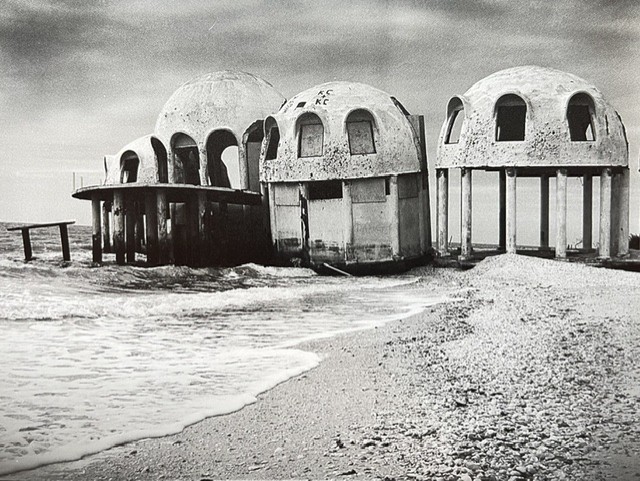
What if I have a nice photograph that I shot with my digital camera, or my film negative is damaged so that I can’t make a darkroom print without fixing it digitally? Could I make a negative that I can print in my darkroom without investing even more money?
Sometimes the internet doesn’t have the answers
I started out like many inquisitive minds do. I googled it… There are hundreds of videos and how to posts about digital negatives for alt processes. Platinum, mostly but some others. Dozens of opinions on what the “best” way to make a digital negative. They all stated you had to have a pigment based printer in order to block the UV light for those processes.
Except for one video that said you could use “any” inkjet printer. However, in the video the printer that was used was an epson pigment printer. So nothing concrete on the dye printer question. The bottom line is no one was talking about silver gelatin with dye based inkjet negative.
So I dug deeper. I went down the rabbit hole of quadtone RIP, tone curves, easy digital negative, etc. Still, all of the information was for alt process.
While I was reading and searching, I had a conversation with some other photographers and one of them, a very talented photographer working with the calotype process, was explaining her work flow. She is represented by a couple of top galleries and has shown work all over. The whole group was very keen on hearing how she made her digital negatives. “do you use QTR, EDN or how did you figure out your tone curve?” She just looked at all of us like we had three eyes. Then she said, “I don’t know anything about that stuff (spoken like a true artist). I just invert the file and put it on a thumb drive and my husband goes to Office Depot and they print the negative for me.” What?… Could it be that easy?
At that point I decided I just had to figure this out for myself.
One Step at a Time
I wanted to use the tools I already had and keep any expenses of new tools as low as possible. This was after all, an experiment. What I already had:
- Darkroom with Durst enlarger
- Assortment of darkroom paper
- Contact printing frame
- Canon Pro-100 dye based photo printer
- Flatbed scanner (epson)
- Photo editing/processing software
- Cameras, film and digital
I am already pretty invested in the wet printing process and had significant tools for a digital workflow too. I didn’t need to invest in much more to give it a try. What I needed was some transparency film to print on. There are a lot of recommendations online, Pictorico and Fixxons seems to be the top choice according to the internet. I didn’t want to invest too much for my test so, I went to Office Depot and bought what they had for overhead transparency film for inkjet printers. Just ordinary stuff.
From what I had read, it seemed that the a particular color in your printers ink set could be better at blocking UV light than black. A shade of red or green or yellow might block light better than black. It made sense… If it worked for UV it probably would be the same for visible light from an enlarger after all.
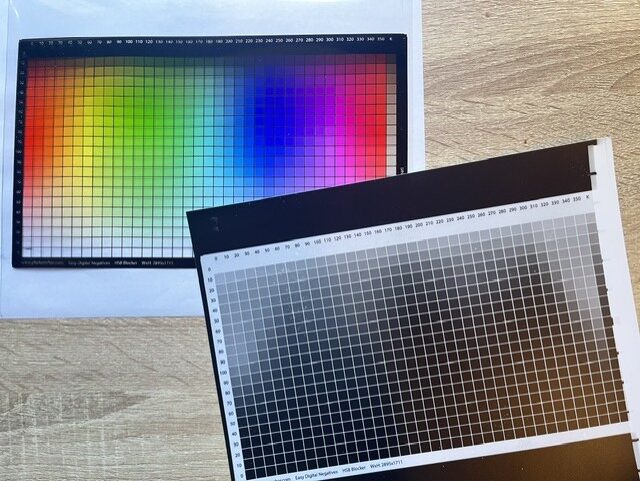
I was wrong on that one. I printed the easy digital negative (EDN) target file, put it in my contact print frame with some Arista resin coated paper and exposed for what I knew was a good exposure for film contact sheets on that paper. None of the color squares came close to blocking the light. But… the black boarder sure came close!
Now that I knew black was the blocking color for my Canon Pro-100 I decided to make a step wedge so I could get an idea of what the tonal range of the black inks would produce on the silver paper. I made steps of 5% increase from black to white.
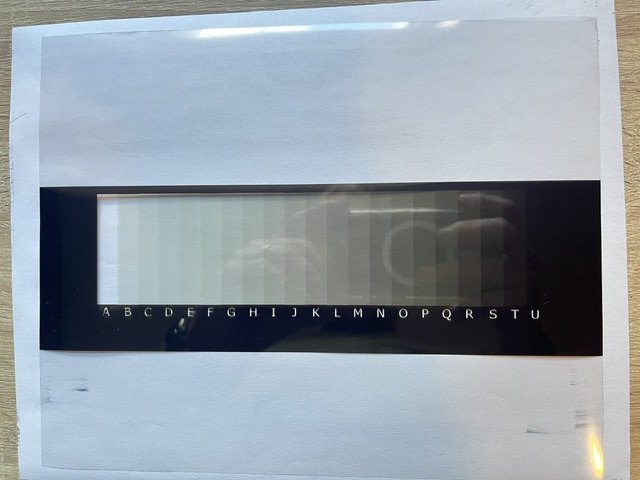
I noticed on my initial test prints of the step wedge the white wasn’t fully clear paper white. It was close. That meant the black ink wasn’t fully blocking light. I adjusted my exposure time on my timer until I got a good black and a clear white. Then I took a look at the tones in between. I was shocked. Without a curve applied to the image in photo editing software, to my eye, each tone step was very accurate. I thought, “maybe it is that easy”.
Forging on, it was time to make a test negative. I picked an image that I have made digital prints of but couldn’t make darkroom ones because of damage on the original film negative. I included my step wedge in the negative below the image to make sure I was seeing the tonal range separately. Putting the the printed negative and the paper in the contact printer I exposed for what I figured out was my base exposure time from my step wedge tests earlier.
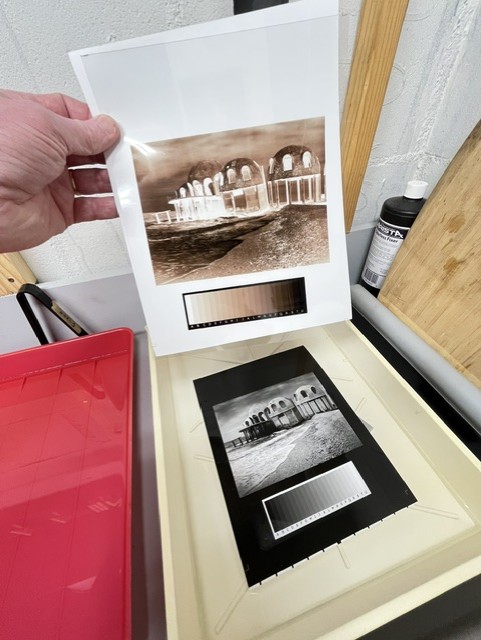
In the dark, under red lights I put the print in the developer tray and watched… Bam! There it was. Perfect. Just like I was hoping. Now I knew that I could print any image from a digital file in the darkroom on silver gelatin paper from a dye based printer. Because I answered my own question!
I know that every paper will behave differently and I will have to run step wedge tests on any other papers. I might need to make a curve in my image editing software to adjust the tonal scale for other papers, but I know I can get a really nice print from a dye based inkjet negative.
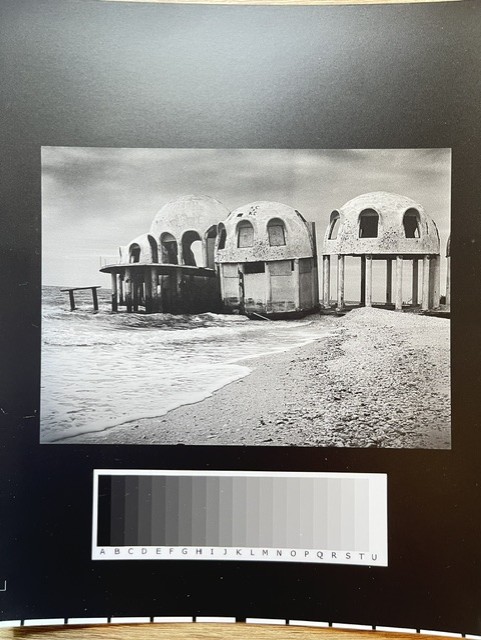
I am looking forward to the options I now have to printing high quality silver prints from any source. This opens up a lot of possibilities.
If you have a question about some photographic process, chances are you will find about 80% of what you need online. You may also find that there are people who have totally different views on the subject and you can’t make a determination based on the “yeah it works” or the “it never works” or “to do it right…” The only way to really understand how these things work you will have to try it yourself. Invest in your own experience and knowledge.
If you like the content I post here on the blog then maybe you will be interested in my email newsletter. I send them out with other news, thoughts and tips on photography as well special print offers. Add your email in the form below. You can unsubscribe anytime, you won’t hurt my feelings.